
The Silent Killers of AI ROI. Diagnosing MLOps Pipeline Bottlenecks, Part 1
March 17, 2026
By Hubert Brychczynski
Artificial Intelligence,
Machine Learning,
AI Engineering

Various studies over the last two years attempted to measure the success rate of AI adoption in the enterprise. The results are underwhelming. Estimates by the likes of RAND, McKinsey, MIT, and others, consistently show that anywhere between 75 to 95% of AI pilots flop. Why?
Even if a data science team delivers a model with 94% accuracy, the real world can put it under such pressure that what shone in testing breaks down in production. Insiduous bottlenecks that didn’t cause issues in tests now slow the system down or downright crash it.
This article draws on our own experience with specific bottlenecks that kill AI ROI, and discusses the interventions that fix them.
In Part 1, we'll go through three common production pipeline chokepoints and illustrate them with real case studies where we've diagnosed and eliminated these bottlenecks at scale.
Bottleneck #1: Framework Performance & Algorithm Inefficiency
When Your Deep Learning Stack Runs Slower Than It Should
Imagine two deep learning stacks. For some reason, one lags behind the other. If you’re tempted to rewrite everything from scratch, resist it. Check the implementation layer first. Inefficient file management, suboptimal input pipelines, or algorithms written without profiling may all contribute to the problem.
Are your training runs dragging on for days instead of completing in hours? Does the inference latency thwart real-time applications? Do the GPU cycles tap out before the model starts processing data?
Sometimes, the culprit can be found in the input pipeline - as was the case for Microsoft’s Bing Maps.
Real-World Case Study: Bing Maps DeepCAL Optimization
Bing Maps used machine learning for geocoding - that is, the process of converting addresses into precise geographic coordinates. Their DeepCAL model (Combined Alterations) had two implementations running in production: one in TensorFlow, one in PyTorch. The problem was straightforward but severe. The TensorFlow implementation was running 10x slower than the PyTorch version for equivalent workloads.
It didn't help that one of the fundamental training algorithms was suboptimal, or that the TensorFlow implementation was using fixed encoding lengths, which inflated file sizes by 3-4x.
Our intervention had several components.
First, we completely refactored both the TensorFlow and PyTorch implementations of DeepCAL.
Second, we addressed the batching inefficiency. The original approach used large single files with fixed-length encodings, which prevented parallel I/O. We converted these into smaller TFRecord files that could be processed in parallel, enabling the system to leverage multiple GPUs effectively. This alone provided a 2x speedup in batch processing.
Third, we rewrote the training algorithm from scratch. Following Python performance best practices, we eliminated unnecessary computation and structured the code to minimize overhead. The result was a 7x acceleration in training runs.
Finally, we optimized the TensorFlow input pipeline specifically. The original implementation used Keras APIs. We replaced these with direct tf.data API calls and aligned the pipeline with HuggingFace standards for efficiency.
The outcomes were dramatic (Figure 1). The TensorFlow implementation went from 10x slower than PyTorch to 5x faster - translating into a 50x improvement from its original state. Training runs accelerated by 7x. Batch processing on dual GPUs saw a 2x speedup. And distributed processing on dual CPUs gained an additional 30% performance improvement.
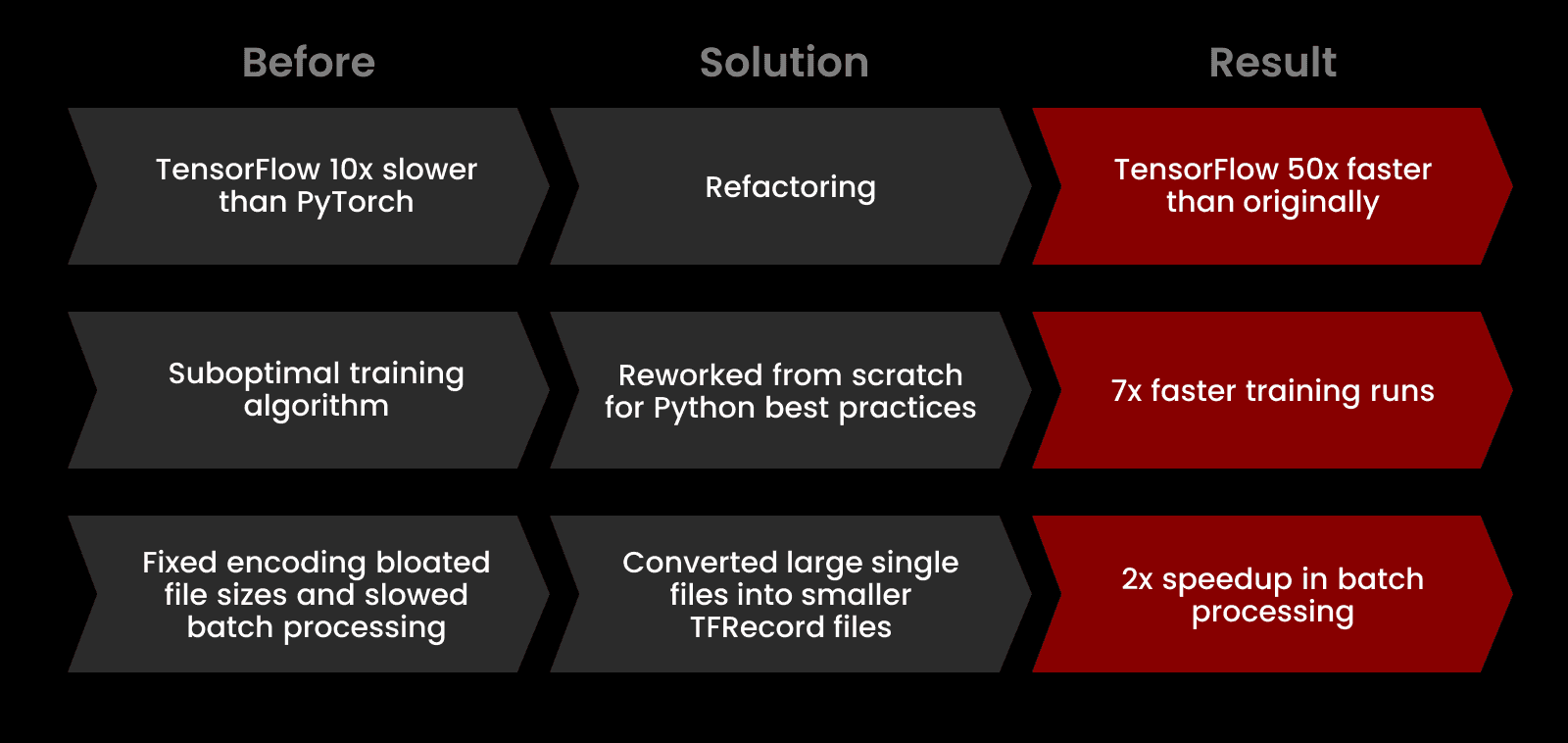
Fig. 1: Optimizing deep learning pipelines for Bing Maps.
The Takeaway
When your bottleneck is framework-level performance, don't default to switching frameworks. You may be able to fix the issue by identifying deviations from optimal patterns. Seek engineers who can read profiler output, understand computational graph execution, and refactor production code without breaking existing functionality.
Bottleneck #2: Resource Contention & Scale
When Production Traffic Brings Your System to Its Knees
Your staging environment works beautifully. Your load tests pass. Your demo to stakeholders goes perfectly. Then you flip the switch to production and everything fails.
This is the classic resource contention failure pattern. Your system was designed and tested for average load, but production doesn't deliver average. Loads become spiky and unpredictable, with concurrent request patterns that your architecture wasn't built to handle. Database connection pools max out. Query execution times balloon from milliseconds to timeouts. Error rates skyrocket. Your monitoring dashboard turns red and your on-call rotation starts getting very familiar with your incident response runbook.
The knee-jerk response is usually scaling: throw more database capacity at the problem, add more application servers, increase connection pool limits. Sometimes this helps. But it might be also fixing the wrong problem. No matter how much compute you'll use, occasional anomalies will stretch its limits. The key is to be ready for when that happens. Implement proper fail-safe mechanisms and prevent cascading failures that take down the entire system.
Here's what this looked like for a chatbot deployment we worked on recently.
Real-World Case Study: High-Traffic Chatbot Load Shedding
A domain-specific chatbot performed well in tests under regular conditions. However, it hit a wall and froze when faced with multiple concurrent queries. After that, error rates spiked to nearly 100%.
The root cause was database throughput limitation. The chatbot used the database to answer queries. With too many parallel connections, query execution times exceeded the three-minute timeout threshold. The entire system locked up.
Several alternative solutions were on the table. Scaling the database was the obvious first choice, but budget constraints made it secondary. Queuing requests was another possibility: accept all incoming queries and process them when capacity becomes available. This, however, proved impractical for the client's use case. If the chatbot didn't respond within three minutes, users would lose interest or worse - refresh the chat and open new instances, exacerbating the overload problem. Getting back with answers hours or days later was also pointless; users would never log back in to see them.
We implemented load shedding as the primary solution, with scaled database resources as a supporting component. Load shedding is the practice of intentionally rejecting excess requests to preserve system stability for requests within capacity. Instead of trying to serve everyone and failing, you serve as many users as you reliably can and gracefully turn away the rest.
The first step was capacity testing to establish the actual system limits. We ran incremental stress tests ramping traffic from 10 to 20 to 40 to 80 to 150 queries per minute in fifteen-minute intervals. This confirmed that without load shedding, the system began failing at approximately 40-50 requests per minute after just three minutes of sustained load. We then scaled database resources to a level that could reliably handle 150-200 queries per minute and validated this as the new Service Level Objective with the client.
Our load shedding implementation relied on a semaphore. The semaphore sits in front of database retrieval and maintains a count of available connections based on our benchmarked capacity limit. Every incoming request has to ask the semaphore for permission to proceed. If connections are available, the request is routed to the database and the count decreases by one. When the transaction completes, the count increases again, freeing capacity for the next request.
When the counter hits zero, the system is at maximum concurrent load. In a traditional architecture, the next request would wait in a queue until a connection becomes available. In our solution, the next request doesn't wait. The system throws an exception and returns a user-friendly error message: "The chatbot is currently at capacity. Please try again in a moment." This preserves system responsiveness for users who do get through and prevents the cascading failure pattern that was crashing the entire service.
The semaphore made a dramatic difference (Figure 2).
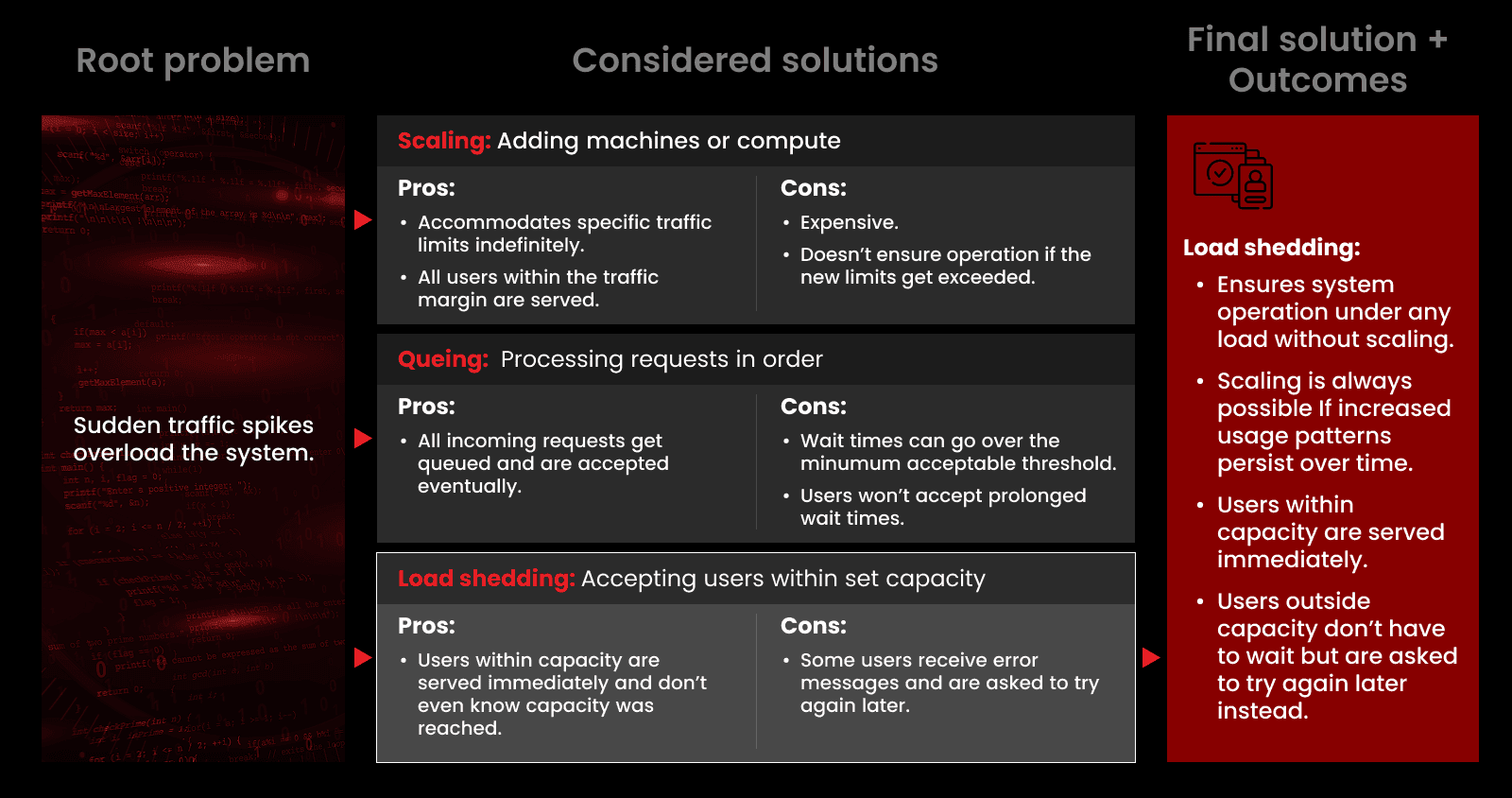
Fig. 2: The path to ensuring system operation under traffic spikes for a domain-specific chatbot.
After implementation, the error rate dropped near 100% under heavy load to below 1%. Excess requests received immediate, clear feedback to try again later. Users who did get through the semaphore received prompt responses within the time limit. What's more, those users never realized the chatbot was operating near its capacity. Their experience was indistinguishable from a system with unlimited resources.
The Takeaway
When your bottleneck is resource contention under load, investigate and understand your actual breaking points through load testing, enforce limits programmatically, and provide graceful degradation instead of catastrophic failure. The users you can't serve immediately know to try again. The users you do serve get a reliable experience.
Bottleneck #3: Memory & Storage Footprint
When Your AI Won't Fit Where It Needs to Run
Modern AI systems are memory-hungry. Vector embeddings for retrieval-augmented generation, large language model weights, feature stores, and cached inference results compete for limited RAM and storage. In cloud deployments, this translates to spiraling infrastructure costs. In edge deployments, it's often the difference between "works" and "physically impossible."
A RAG-powered chatbot may perform beautifully with 10,000 documents in the vector database. Multiply that by ten, and memory usage becomes unsustainable. At a million documents, accuracy gives way to deployability: higher-dimensional embeddings get sacrificed for smaller footprints that can fit in available memory.
Physical constraints make this problem even more severe in edge applications. Edge AI runs locally on a device with limited storage. Unstable internet connection, if any, prevents it from falling back on the cloud. A model that works fine on a development server with 64GB RAM might tap out fast on a target device with 4GB.
The standard answer to memory pressure is compression. Vector quantization techniques like Product Quantization (PQ) have been the industry standard for years, and they work well. PQ splits each vector into equal-sized subspaces and compresses each subspace uniformly. It's efficient, hardware-friendly, and well-supported in frameworks like FAISS.
But uniform compression misses an opportunity. Not all dimensions in a vector embedding carry equal information. Some dimensions capture critical signals; others contribute minimal value to search accuracy. PQ treats them all the same, compressing a high-signal dimension just as aggressively as a low-signal dimension.
This is the insight behind JECQ, our open-source compression library for FAISS users.
Real-World Case Study: JECQ Dimension-Aware Vector Compression
JECQ approaches vector compression the way a video codec approaches frame compression. In video encoding, you don't compress every frame identically; frames with minimal motion get more aggressive compression than those with complex scene changes. Similarly, JECQ doesn't compress every embedding dimension identically. Instead, dimensions with low statistical relevance get more aggressive compression than those carrying critical information.
Our algorithm starts by analyzing the statistical properties of each dimension in the embedding space. Specifically, it examines the isotropy of each dimension using eigenvalue analysis of the covariance matrix. Dimensions that show high isotropy (meaning they're capturing noise rather than signal) are candidates for aggressive compression or elimination. Dimensions with low isotropy (meaning they're capturing meaningful semantic structure) need to be preserved with higher fidelity.
Based on this analysis, JECQ classifies each dimension into three categories: low relevance, medium relevance, and high relevance. Low-relevance dimensions are simply discarded. They contribute so little to search accuracy that removing them entirely has negligible impact on results. Medium-relevance dimensions are quantized using just one bit. This provides some signal preservation while minimizing storage use. High-relevance dimensions undergo standard Product Quantization to maintain maximum accuracy for the information-dense parts of the embedding.
The compressed vectors are stored in a custom, compact format accessible through a lightweight API that integrates with existing FAISS infrastructure. This means you can adopt JECQ without rewriting your vector search pipeline. It's a drop-in optimization for systems already using FAISS.
The results demonstrate the power of dimension-aware compression. In early testing, JECQ achieved a 6x reduction in memory footprint while maintaining 84.6% of the search accuracy compared to uncompressed vectors.
The practical implications are significant. For enterprise RAG systems, this translates directly to lower cloud storage costs and the ability to maintain larger document collections without proportional infrastructure scaling. For edge AI deployments, it makes previously impossible applications viable, as you can fit semantic search or RAG capabilities onto devices that couldn't accommodate the full-precision embeddings.
We've released JECQ under the MIT license specifically because we believe dimension-aware compression should be a standard capability available to anyone working with vector embeddings at scale. The library ships with an optimizer that takes a representative data sample and generates an optimized parameter set for your specific embedding distribution. You can then fine-tune these parameters by adjusting the objective function to balance your preferred accuracy-performance trade-off.
The Takeaway
When your bottleneck is memory footprint, generic compression isn't enough. You need approaches that understand the statistical structure of your data and apply compression intelligently based on information density.
What's Actually Blocking Your Pipeline?
If any of these bottleneck patterns look familiar, you're probably three conversations away from another deadline slip.
Production AI bottlenecks require surgical engineering. If your ML systems are stalled at the infrastructure layer, we have the expertise to help diagnose and fix specific blockers.
Frequently Asked Questions
Tests run on clean data, stable hardware, and predictable traffic. Production adds skewed inputs, cold starts, concurrency, timeouts, noisy neighbors, and hard memory limits. Those conditions expose bottlenecks outside the model, especially data loading, serialization, network hops, and contention.
Profile end to end under production like load, then zoom in with tracing and microbenchmarks. Separate data path, compute, and infra overhead so you know what to change. Fix the biggest limiter first, then re measure to verify the win.
Optimize the full path, not just the model: cut data movement, batch intelligently, cache repeat work, and cap concurrency. Use model and runtime tactics like quantization, mixed precision, compilation, and better kernel efficiency when accuracy allows. Add guardrails like autoscaling limits and load shedding so spikes do not turn into outages or surprise bills.
Related Blogs
Let's talk about your project
Let's talk about your project
Ready to discuss your software engineering needs with our team of experts?